

Common AI feature problems and errors
Do the Yoast AI Generate features not work for you? Are you getting an error trying to use Yoast AI Optimize? In this article, we’ve listed the solutions to most common problems and errors that can occur when you use the Yoast AI features. With these solutions, you’ll get back to generating in no time!
You see the ‘something went wrong’ error message
When you receive the message that something went wrong, there are several possible causes. Check below if these solutions fix the AI feature problems and errors.
| Cause | Solution |
| Your site language and the language of your content are different | Go to the WordPress dashboard and go to Settings > General > Site language. Ensure that the content language and site language match. Otherwise, the AI feature will not work. |
| You have chosen a formal language | Go to the WordPress dashboard and go to Settings > General > Site language. Choose the non-formal version of the site language. |
| Your connection has timed out | Please follow the steps under How to refresh your connection |
| The image uses a format that Yoast AI image alt text doesn’t support, such as AVIF or SVG | Yoast AI image alt text supports PNG, JPEG, WebP, and non-animated GIF images. If your image uses another format, convert it or add the alt text manually. |
You see the following error message
There are several other types of AI feature problems and errors. Try the solutions below to continue generating.
| Error | Cause | Solution |
| To access this feature, you need a Yoast SEO Premium subscription | The Yoast SEO Premium or Yoast WooCommerce SEO subscription is not activated for this site | Check that you have connected your subscription to your site. In addition, check in the Yoast SEO menu under the Premium category that your subscription status displays both Installed and Activated. |
| Connection timeout | There is a problem with your connection, causing a delay | Please follow the steps under How to refresh your connection |
| Due to OpenAI’s strict ethical guidelines and usage policies, we are unable to generate […] for your page | Your content includes material that is not compliant with OpenAI’s ethical guidelines and usage policies | If you want to use the AI features, please remember to avoid any explicit content, such as violent or sexual material |
| Yoast AI cannot reach your site Browser console error callback failed: the site that requested the token could not be reached | Your site is unable to communicate with our AI features. This applies to test sites, instances where your REST API is password-protected, some sites that are monitored by security services, or when the site is not publicly accessible for another reason. | Check that your security plugins and services, such as the Cloudflare Bot Fight mode, do not prevent communication between your site and the AI features. Review the settings for the service blocking the AI features and ensure it allows all traffic to /wp-json/yoast/v1/ai_generator/ and all subfolders under this path. If you have other plugins or need to use the core WordPress REST API, you’ll need to allow additional variations of that path. For example, /wp-json/wp/v2/ is the core WordPress path |
| You’ve reached the rate limit for today | You have hit the rate limits for using the AI features set by Yoast SEO | Spread out your requests for AI Generate and AI Optimize. For more information, see also Rate limits for the AI features in Yoast SEO |
| Please enter a valid focus keyphrase | The product doesn’t have a valid focus keyphrase. You need to enter one before you can generate image alt text. | Add a focus keyphrase to the product, either in the Yoast SEO section of the product editor or in the Focus keyphrase field in the Bulk Editor. Then generate the alt text again. |
You have another problem
See below if the error or problem you have encountered has a solution.
| Error | Cause | Solution |
| I cannot find the Yoast Generate or Yoast AI Optimize features in WordPress | You are using the free version of Yoast SEO or have not upgraded to the latest version of Yoast SEO Premium and/or Yoast SEO WooCommerce | If you want to use the AI features for posts, pages, categories and tags, upgrade to Yoast SEO Premium and make sure you have updated to the latest version If you want to use Yoast AI Generate for products, upgrade to Yoast WooCommerce SEO and make sure you’ve updated to the latest version |
| The AI features are unavailable in my Yoast SEO metabox/sidebar, even though I enabled the feature in the Yoast SEO settings | Your connection has timed out | Please follow the steps under How to refresh your connection |
| I can’t see the Generate image alt text option on the Yoast SEO Bulk Editor screen | Your site runs an older version of WordPress or Yoast SEO. | Update to WordPress 7.0 and Yoast SEO 28.8 or later. |
How to refresh your connection
Follow the steps below to ensure that your connection to the internet and the AI features work.
- Check that your internet connection works
Ensure that you have a stable internet connection.
- In your WordPress Dashboard, go to Yoast SEO
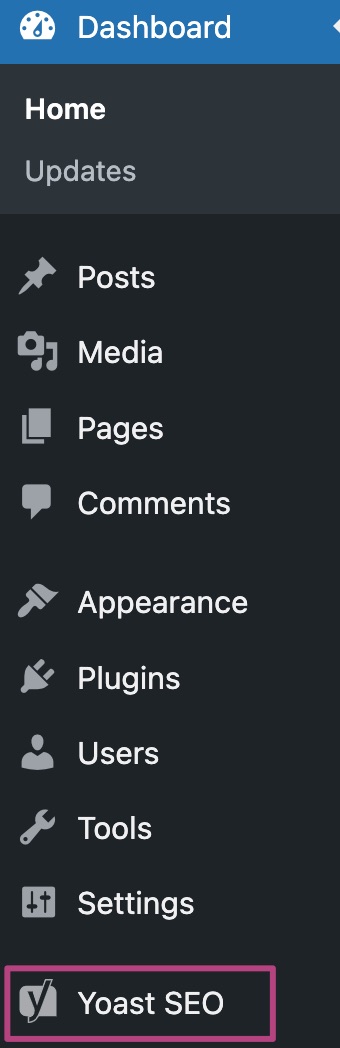
- Go to Settings
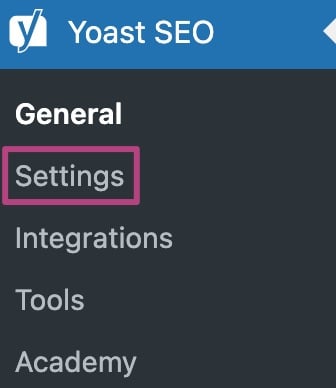
- Under Site features, go to AI tools

- Slide the Yoast AI toggle to Off

- Click Save changes

- Log out and clear your browser cache
Log out and clear your browser’s cache. We’ve provided instructions for clearing browsers. Close all the tabs and windows of your browser.
- Restart your browser and log in
You can now restart your browser and log into WordPress or Shopify again.
- Slide the Yoast AI toggle to On
My problem or error is not in this list
Delete the beta sentences. Keep: If you run into a problem that isn’t listed here, contact our support team. As a result, they may still undergo some improvements or adjustments before they become fully stable. While it’s available for use now, keep in mind that there may be occasional issues or changes as the developers refine the feature.
If you run into problems or errors that are not on this list, please contact our support team for assistance.

Get Yoast SEO Premium
Drive more traffic to your site. Use AI to save time doing SEO tasks. Make SEO easier. And get 24/7 support.
Includes Local SEO, Video SEO & News SEO.
Did this article answer your question?
Still having issues?
Try searching for your issue below